How to Use PLO Spot
Last updated July 25, 2026 · ~7 min read
PLO Spot is a free set of Pot-Limit Omaha study tools: a solver preflop range browser, a decision trainer that grades you, and equity calculators. Everything runs in the browser with no account and no download. This page walks through each tool and what the numbers on screen actually mean.
1. The range browser
The front page is the range browser. Pick your game in the left sidebar — PLO 5 card Pre-flop or PLO 4 card Pre-flop — then click through the action row at the top to reach the spot you want.
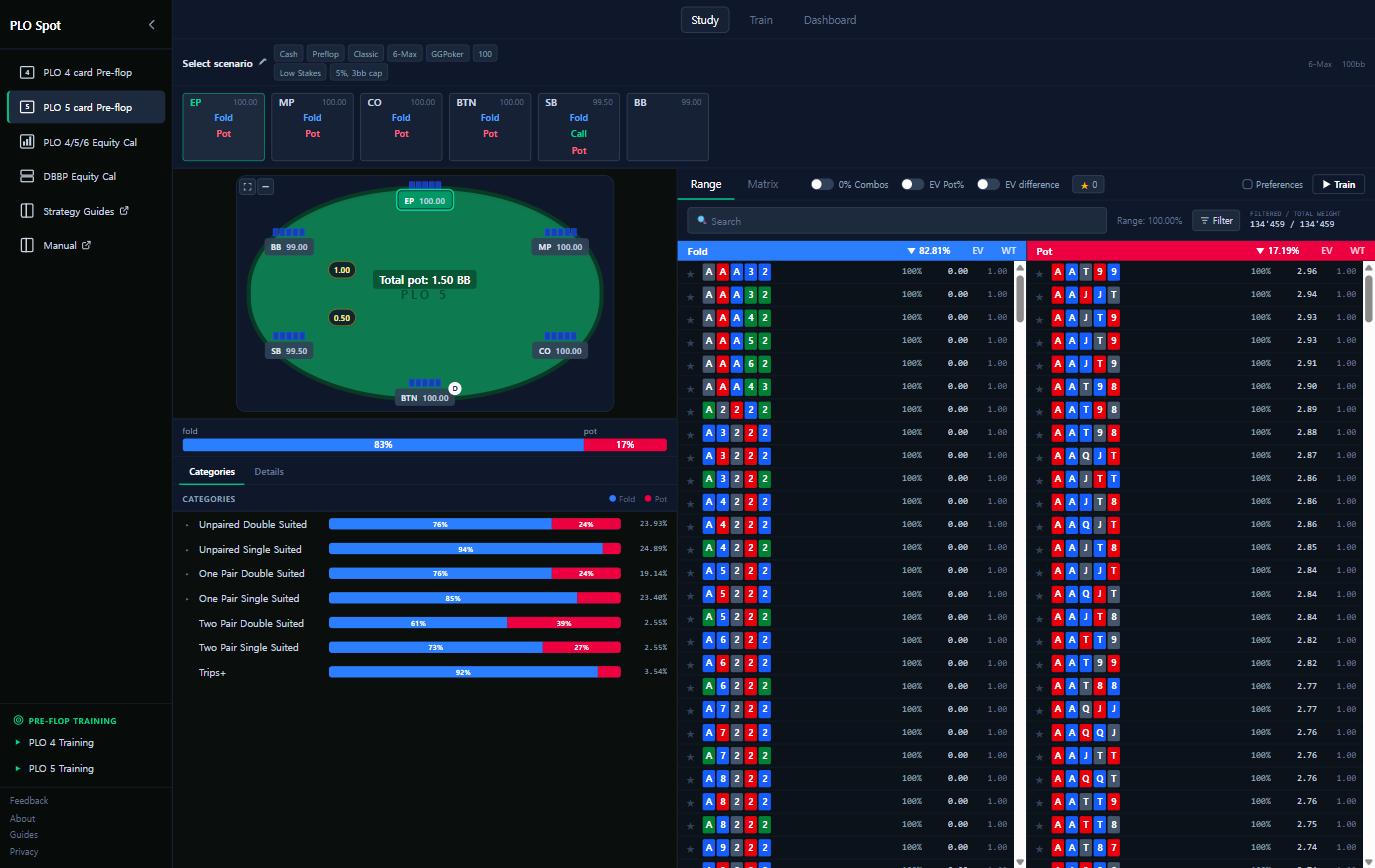
Reading it:
- The action row across the top is the hand so far — each seat shows the actions available to it. Clicking builds the node you want to study, from a simple open all the way to a 4-bet defence.
- The felt shows the situation you have built: who is in, stack sizes, and the current pot.
- The hand list splits by action — Fold on one side, Pot on the other — with every starting hand drawn as real cards. The header shows what share of the range takes each action.
- The percentage next to a hand is how often the solver takes that action with it. 100% is always; a mixed value like 62% means it plays both ways at those frequencies.
- EV is the expected value of that action in big blinds. Comparing the two actions for one hand tells you what the mistake actually costs.
- Categories groups hands by shape — double-suited, one pair, rundowns — which is how patterns become memorable. Individual hands do not transfer between spots; shapes do.
The Matrix tab shows the same strategy as a grid, and the search box and filters narrow a long list fast. In PLO5 there are 134,459 distinct starting hands, so filtering is the normal way to work.
2. The trainer
Reading ranges builds recognition; playing them builds skill. Hit Train in the top nav — or the Train button on any spot — to be dealt real hands from that node and graded against the solver.
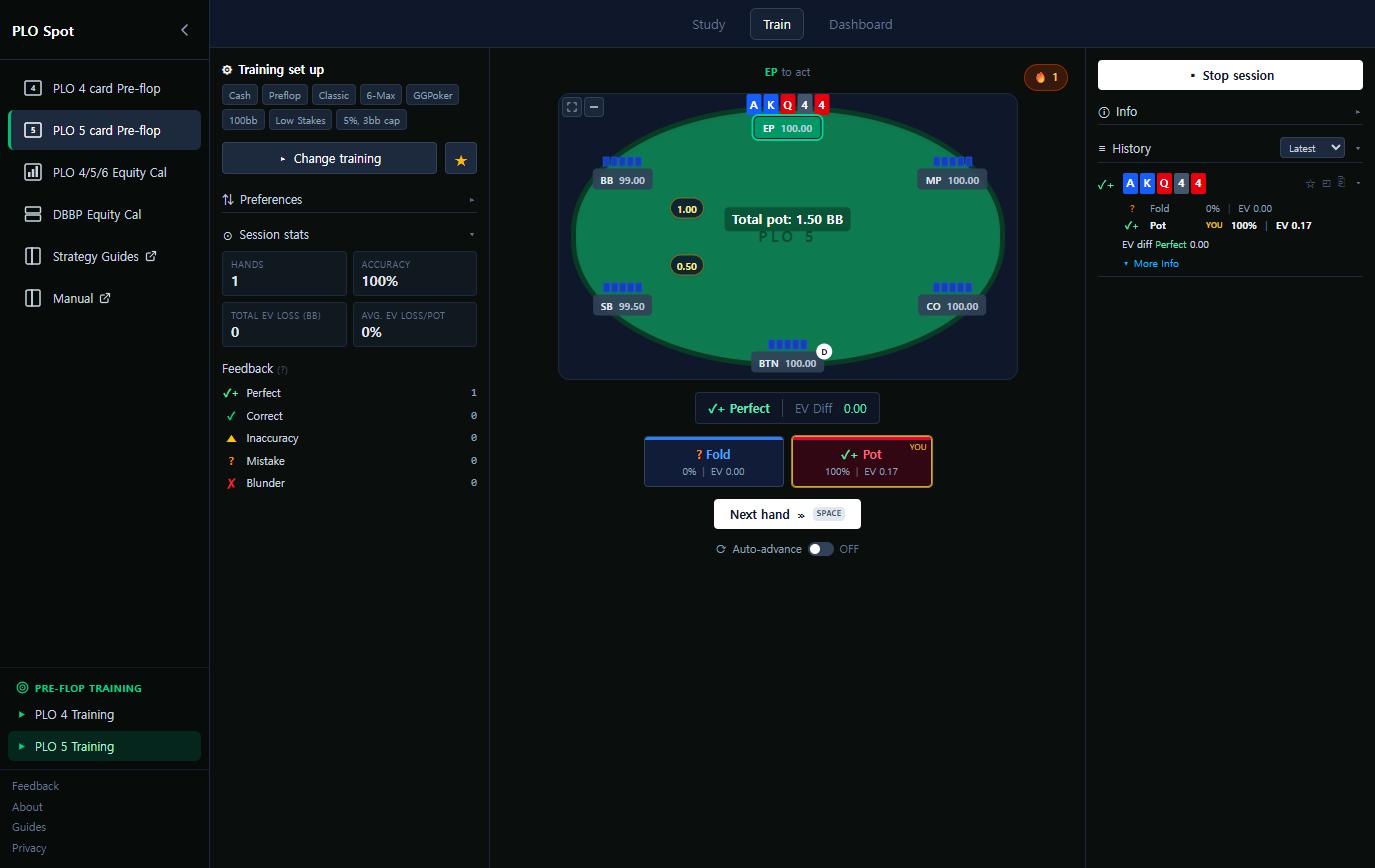
Choose a spot on the setup screen, press Start session, and you are dealt a hand with the actions available. After you choose:
- The verdict — Perfect, Correct, Inaccuracy, Mistake or Blunder — grades your choice against the solver's strategy for that exact hand.
- Both actions are revealed with their frequency and EV, and your pick is marked, so you learn the strategy rather than just a right/wrong signal.
- EV Diff is what the decision cost. Many "wrong" answers cost almost nothing; a few cost a great deal. Learning which is which is the point.
- Session stats track hands, accuracy and total EV loss, and the history panel keeps every hand for review.
Auto-advance moves you to the next hand automatically; turn it off if you want to study each result. The Dashboard aggregates sessions over time and flags the spot categories where you lose the most EV — which is where your study time belongs.
3. The equity calculator
Any time a hand surprises you, settle it here. Choose the game (PLO4, PLO5 or PLO6) and the
number of players, then enter hands by typing them (AsKhQdJc) or clicking cards in
the deck grid.
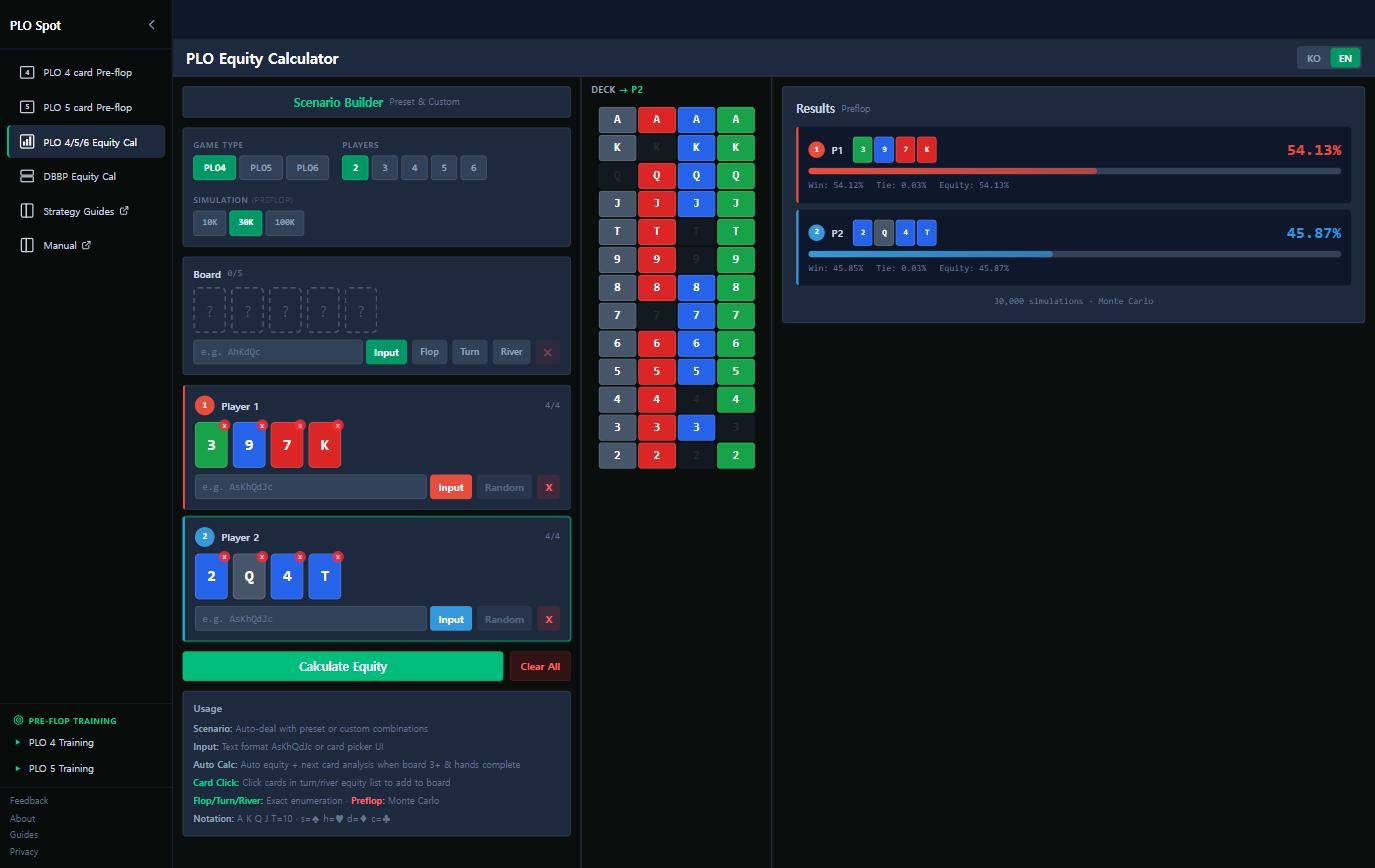
- Random deals a hand for you — useful for building intuition quickly.
- Add a board to see equities on the flop, turn or river. With three or more board cards the calculator enumerates exactly; preflop it uses Monte Carlo simulation, and you can raise the sample size for a tighter number.
- The results panel separates win from tie, which matters in Omaha where chopped pots are common.
There is a separate double board bomb pot calculator for the two-board format, where the boards share a deck and are therefore not independent — the reason a naive "double the single-board equity" estimate is wrong. Background in the double board bomb pot guide.
A study routine that works
- Pick one spot you actually meet often — say, defending the big blind against a button open.
- Read it in the range browser. Look at Categories, not individual hands.
- Drill it in the trainer for twenty hands.
- Check the dashboard to see whether your accuracy in that category moved.
- Read the theory behind it in the strategy guides so the pattern generalises.
Twenty minutes on one spot beats an hour of browsing everything. The full manual documents every panel and setting in detail.
Frequently asked questions
Is PLO Spot free?
Yes — the range browser, trainer, dashboard, equity calculator and double board calculator are all free, with no account and no download. The site is supported by advertising.
Do I need an account?
No. Preferences, training history and dashboard statistics are stored locally in your browser, which also means clearing browser data clears your history.
What do the percentages mean?
How often the solver takes that action with that hand. 100% means always; a mixed value means the hand is played both ways at those frequencies. EV is shown in big blinds.
Which games are covered?
Preflop ranges and training cover PLO5 and PLO4 in 6-max cash games at 100 big blinds. The equity calculator supports PLO4, PLO5 and PLO6, plus a dedicated double board bomb pot mode.